Yarin AmrusiAutomation and systems development

Yarin Amrusi · Business automation and WhatsApp integration Some things in a business shouldn't be done over and over.

Copying an order from WhatsApp, typing details from a document, checking stock in several places - each of these looks small, but they add up over the day.

I build tools that help get this work done with less typing and less switching between systems. Press the button below and tell me about a process that takes up your time. Together we'll look at how to simplify it.

What I build for businesses

  • WhatsApp connected to your business software

    A WhatsApp chat built into the business software: create an order straight from the conversation, and send quotes and payment through WhatsApp.

  • Order and inventory system

    Managing orders, picking and shortages in the warehouse, with a status overview for the team and a connection to SAP Business One data.

  • Custom automation and AI tools

    Tools built around the work processes you already have, with a person approving where it matters.

Ready product

Digital archive for businesses

Scan, and the system sorts and files your documents by barcode. Free one-week trial.

Details and price

It can start with a short conversation

Choose the process closest to what happens in your business, add a few words if you like, and get a message ready to send to Yarin.

What would you like to talk about?

Optional. You can write just the point that bothers you.

0/280

Preview

This is the message that will open in WhatsApp

You can read and edit it there before sending.

Hi Yarin, I found you through your website and would like some advice. Topic: Orders and warehouse. I'd like to see whether we can start with a small review of the process.Open the message in WhatsApp

The site does not store the text or send the message automatically. When you click, the prepared text goes to WhatsApp as part of the link; there you can check, edit and send it yourself.

Selected projects

Projects that show how I approach orders, warehouses and repetitive processes.

Live system

Order and warehouse management system

An internal system that brings together orders, picking statuses, shortage statuses and customer details, and gives the team a status overview and control tools. It also includes product images, barcode scanning and a connection to existing SAP Business One data.

How an order moves through the warehouse

An operational system I developed, used by Kol-Bo Lebinyan Amrusi Ltd.

An example of the operational process I built: from an incoming order to a clear status overview for the warehouse team.

A full screenshot of the system (Hebrew interface) with fictional demo data.

Order handling steps

  1. An order comes in
    Unsorted

    The order starts as Unsorted, so it's clear what hasn't been handled yet.

  2. The warehouse handles it
    In progress → Check

    After printing and picking, the order moves to In progress, and then to Check.

  3. Finishing with a clear status
    Ready / Partly ready

    When all items are collected, the order is Ready. If an item is missing, it's marked Partly ready, and a purchase request linked to the order is created in the background.

  4. The customer gets an update
    WhatsApp or SMS + email

    When the order is ready, the customer gets a WhatsApp message and an email saying it can be collected or the delivery will go out soon. If they don't have WhatsApp, the message is sent by SMS. When the order is partly ready, they get an email update.

This is only part of the system. It also has tools for managing shortages, alerts, notes and an ongoing warehouse overview.

  • Status overview for warehouse staff
  • Clear order and picking statuses
  • Handling shortages and substitute products
  • Product images and barcode scanning
Live system

Orders, quotes and payment on WhatsApp

The chat is built into the business software and connected to the store's business WhatsApp, so conversations, orders and customer follow-up are handled on one screen.

  • Clicking the magnifying glass creates an order and opens the customer's details
  • Previous orders are available above the chat
  • Reminders next to the chat screen
  • Quotes and payment through WhatsApp
The business WhatsApp is connected to the software, with follow-up reminders next to the chats.
Clicking the magnifying glass in the chat creates an order for the customer; their details and previous orders are on the same screen.

Screenshots from the live system (Hebrew interface), with private details replaced by demo data.

Another example

Another direction I'm developing and testing.

In testingNon-profit app

One More Look - a reminder after driving

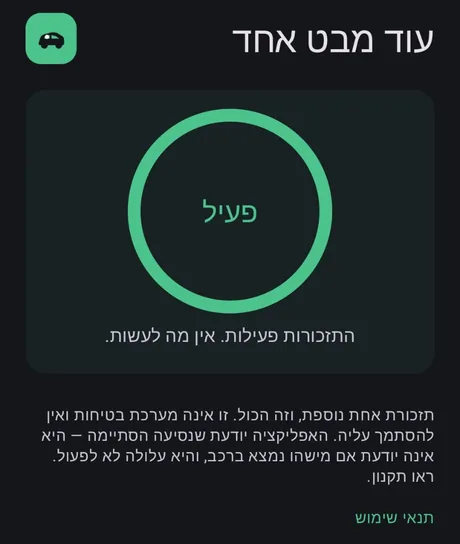
An Android app that runs in the background, detects the end of a drive and reminds the parent to check that the child hasn't been left in the car. The app works and is currently being tested. Connecting a Bluetooth sensor may be explored in the future.

I plan to publish the code on GitHub as open source and to release the app on Google Play, so it can be downloaded.

The app is an extra reminder layer and does not replace the driver's responsibility or an approved safety system.
Home screen of the One More Look app (Hebrew interface): a green circle marked Active, a message that reminders are on, and a note that it's an extra reminder, not a safety system
A screenshot from the app (Hebrew interface).
Yarin Amrusi

About me

I'm Yarin. Alongside software development, I come from hands-on experience working in and managing a construction-sector business with about 30 employees. Day to day I deal with orders and inventory, collections and bookkeeping, running the business website, telephone sales, working with agents and customer service.

That experience is why I'm interested in automation. When I look at an idea for a system, I first want to understand how the work is done today and who will use it. Sometimes a small connection between two tools is enough, and sometimes something new needs to be built.

Which process takes up your time?

Tell me briefly what you do by hand today. We'll see whether a simple, accurate and worthwhile solution can be built.

You can also reach me by email or phone:

The button opens WhatsApp with a prepared message, and the message is sent only if you confirm it there. The site itself does not store your details. Providing details is voluntary and not required by law, and they will be used only to reply to you personally.

Privacy policy